Probleme mit Programm auf Computern mit integrierter Grafikkarte: Unterschied zwischen den Versionen
Hsboot (Diskussion | Beiträge) Keine Bearbeitungszusammenfassung |
Hsboot (Diskussion | Beiträge) Keine Bearbeitungszusammenfassung |
||
| Zeile 67: | Zeile 67: | ||
<!-- Do not write text below this tag --> | <!-- Do not write text below this tag --> | ||
<br class="iwlinks"/>[[pl:Problemy z poprawnym wyświetlaniem grafiki i stabilnością programu na komputerach ze zintegrowaną kartą graficzną|Problemy z poprawnym wyświetlaniem grafiki i stabilnością programu na komputerach ze zintegrowaną kartą graficzną]][[en:Problems with the application on computers with integrated graphics card|Problems with the application on computers with integrated graphics card | <br class="iwlinks"/>[[pl:Problemy z poprawnym wyświetlaniem grafiki i stabilnością programu na komputerach ze zintegrowaną kartą graficzną|Problemy z poprawnym wyświetlaniem grafiki i stabilnością programu na komputerach ze zintegrowaną kartą graficzną]][[en:Problems with the application on computers with integrated graphics card|Problems with the application on computers with integrated graphics card]][[bs:Problems with the application on computers with integrated graphics card|Problems with the application on computers with integrated graphics card]][[bg:Проблеми с приложението на компютри с интегрирана графична карта|Проблеми с приложението на компютри с интегрирана графична карта]][[zh-cn:在仅有集成图形显卡的计算机上使用软件时的问题|在仅有集成图形显卡的计算机上使用软件时的问题]][[cs:Problems with the application on computers with integrated graphics card|Problems with the application on computers with integrated graphics card]][[de:Probleme mit Programm auf Computern mit integrierter Grafikkarte|Probleme mit Programm auf Computern mit integrierter Grafikkarte]][[da:Problems with the application on computers with integrated graphics card|Problems with the application on computers with integrated graphics card]][[et:Problems with the application on computers with integrated graphics card|Problems with the application on computers with integrated graphics card]][[es:Problems with the application on computers with integrated graphics card|Problems with the application on computers with integrated graphics card]][[fi:Problems with the application on computers with integrated graphics card|Problems with the application on computers with integrated graphics card]][[fr:Problems with the application on computers with integrated graphics card|Problems with the application on computers with integrated graphics card]][[hr:Problems with the application on computers with integrated graphics card|Problems with the application on computers with integrated graphics card]][[hu:Problems with the application on computers with integrated graphics card|Problems with the application on computers with integrated graphics card]][[fa:Problems with the application on computers with integrated graphics card|Problems with the application on computers with integrated graphics card]][[it:PROBLEMI CON L'APPLICAZIONE SU COMPUTER CON SCHEDA GRAFICA INTEGRATA|PROBLEMI CON L'APPLICAZIONE SU COMPUTER CON SCHEDA GRAFICA INTEGRATA]][[lv:Problems with the application on computers with integrated graphics card|Problems with the application on computers with integrated graphics card]][[nl:Problems with the application on computers with integrated graphics card|Problems with the application on computers with integrated graphics card]][[nb:Problems with the application on computers with integrated graphics card|Problems with the application on computers with integrated graphics card]][[sv:Problems with the application on computers with integrated graphics card|Problems with the application on computers with integrated graphics card]][[sl:Problems with the application on computers with integrated graphics card|Problems with the application on computers with integrated graphics card]][[sk:Problems with the application on computers with integrated graphics card|Problems with the application on computers with integrated graphics card]][[tr:Problems with the application on computers with integrated graphics card|Problems with the application on computers with integrated graphics card]][[sr-el:Problems with the application on computers with integrated graphics card|Problems with the application on computers with integrated graphics card]] | ||
Aktuelle Version vom 25. Januar 2022, 23:52 Uhr
| Produkt | InstalSystem 5 |
| Art des Artikels | Häufige Fragen |
| Aktuell für Version | GOLD Rev. 12.0 |
Problembeschreibung
Anwender von InstalSystem 5 auf Computern mit onboard Grafikkarten, oder dieser als standard eingestellter Grafikkarte, könnten Probleme mit der Stabilität und der Performance bekommen
Die am häufigst auftretenden Probleme sind:
- Programm stürzt ab / hängt sich auf beim Wechsel zu 3D Ansicht,
- "Black Screen" in der 3D Ansicht und, oder in der 2D Zeichenoberfläche.
Hardwareanforderungen sind im Artikel Technische Spezifikation InstalSystem 5 Programmpaket einzusehen.
Problemlösung
Regelmässiges Update der Grafikkartentreiber wird empfohlen, weitere Lösungsansätze untenstehend.
Computer mit onboard und externer Grafikkarte
Um herauszufinden welche Grafikkarten auf dem Computer installiert sind, nutzen Sie die Angaben in Programmeinstellungen:
- Das Programm starten, die Registerkarte Datei in der linken oberen Ecke wählen, dann Programmeinstellungen auswählen.
- Bildschirmansicht auswählen.
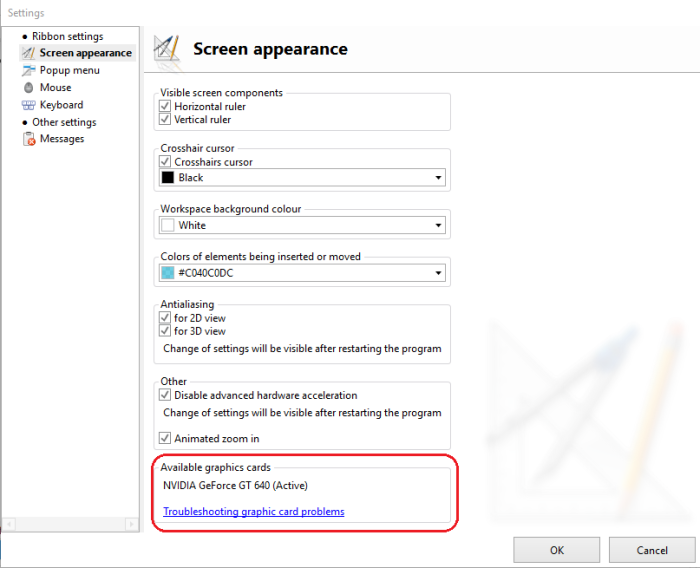
1. Vorhandene Grafikkarten

Globale Auswahl der externen Grafikkarte
Automatische Auswahl der verwendeten Grafikkarte deaktivieren. Dies kann Auswirkungen auf die Windows-Energieoptionen (Energiesparpläne) haben. Die Akkulaufzeit des Laptops wird sich verringern!
- Beispielhaft die Umstellung bei NVIDIA Grafikkarten.
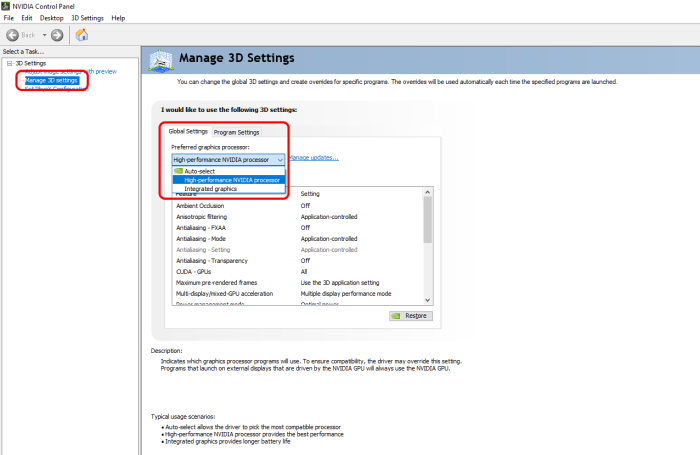
2. Globale Auswahl externe Grafikkarte

Auswahl der externen Grafikkarte nur für InstalSystem 5 Anwendung
Automatische Auswahl der verwendeten Grafikkarte deaktivieren. Dies kann Auswirkungen auf die Windows-Energieoptionen (Energiesparpläne) haben. Die Akkulaufzeit des Laptops wird sich verringern!
Hinweis:
Diese Einstellung muss bei jeder neuen InstalSystem 5 Version durchgeführt werden.
- Beispielhaft die Umstellung bei NVIDIA Grafikkarten.
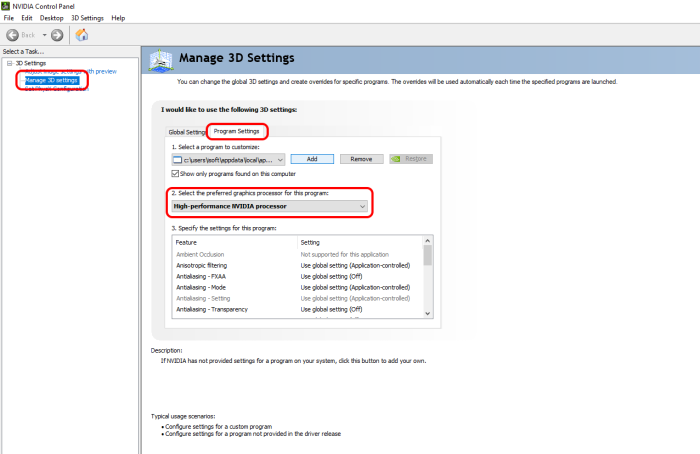
3. Externe Grafikkarte für InstalSystem 5

Computer mit nur onboard-Grafikkarten
Problembehandlung bei Programmabstürzen und -hängern - Kontrollkästchen auswählen
- Das Programm starten, die Registerkarte Datei in der linken oberen Ecke auswählen, dann Programmeinstellungen auswählen.
- Bildschirmansicht auswählen,
- Kontrollkästchen auswählen und Änderungen durch klicken von OK bestätigen.
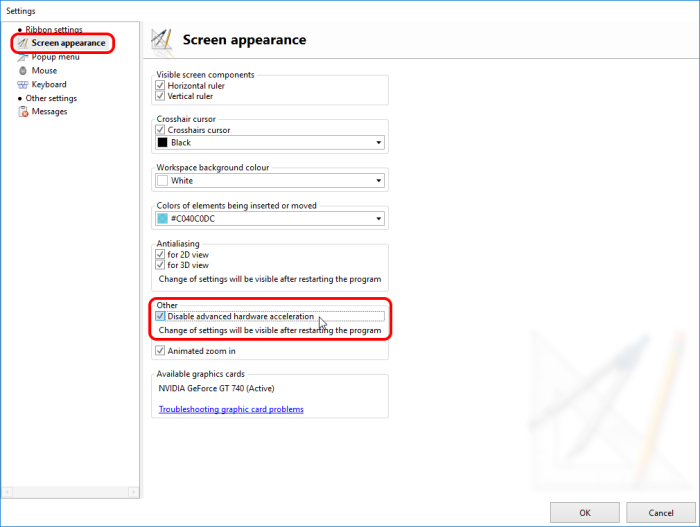
4. Hardwarebeschleunigung deaktivieren

Ein Neustart des InstalSystem 5 Editors ist erforderlich!
Problembehandlung bei Black Screen in der 3D Ansicht und, oder der 2D Zeichenoberfläche - Kontrollkästchen Antialiasing abwählen
- Das Programm starten, die Registerkarte Datei in der linken oberen Ecke auswählen, dann Programmeinstellungen auswählen.
- Bildschirmansicht auswählen,
- Kontrollkästchen Antialiasing für 2D-Ansicht, bzw. Antialiasing für 3D-Ansicht abwählen und Änderungen durch klicken von OK bestätigen.
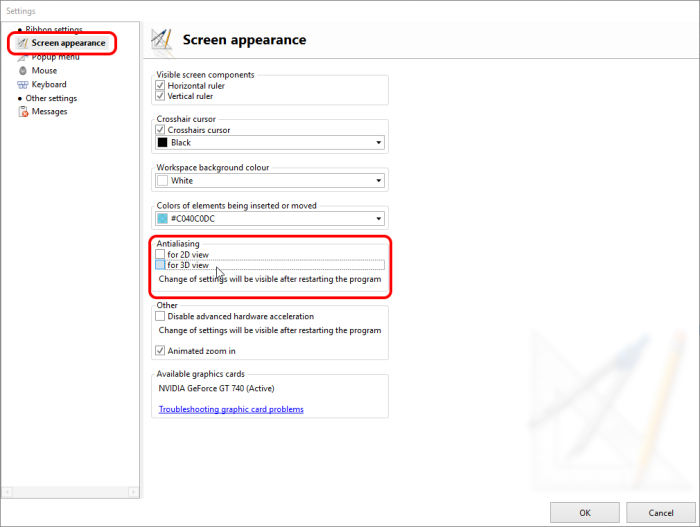
5. Antialiasing deaktivieren

Ein Neustart des InstalSystem 5 Editors ist erforderlich!
Problembehandlung bei Black Screen in der 3D Ansicht und, oder der 2D Zeichenoberfläche - Arbeiten im Fenstermodus
- Im Fenstermodus arbeiten InstalSystem 5 Editor.
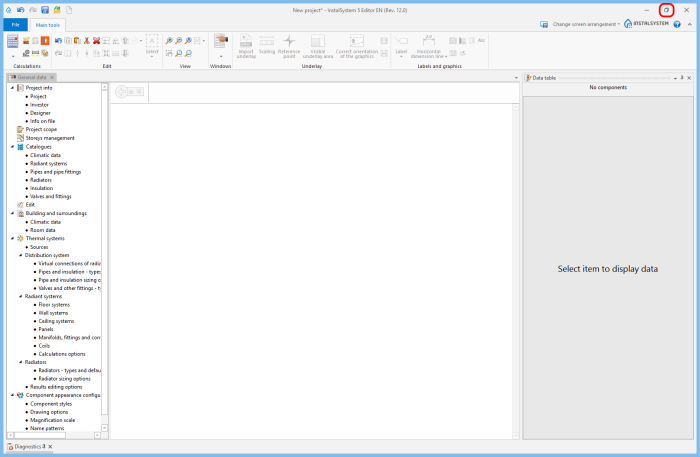
6. Im Fenstermodus arbeiten
